You have probably heard people ask if it's worth speeding up their audiobook to 2x or 1.5x and increasing the comprehension loss, and this is a good question to ask. Most people guess. Some attempt to solve the problem on paper and fail partway. Understanding how the playback speed calculator works, why the numbers are important, and how to use it helps you make the most precise plans when listening to material.
Why a Playback Speed Calculator Is More Useful Than It Sounds
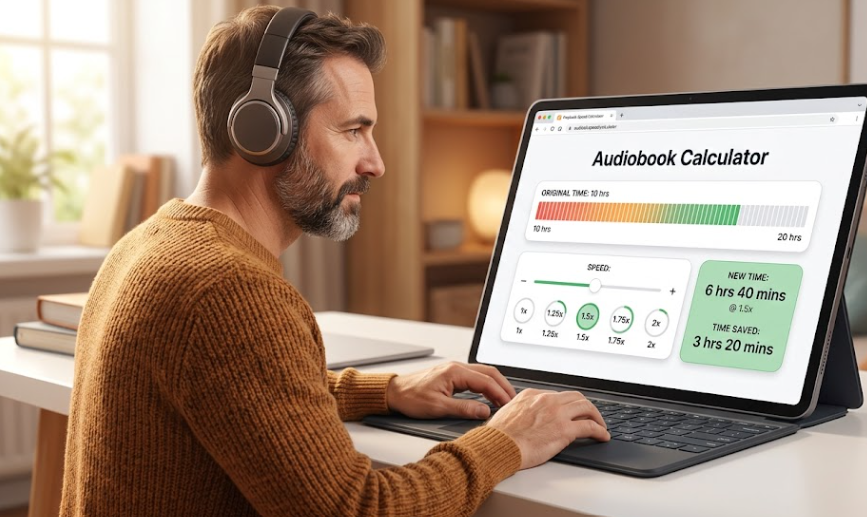
On its surface, this is a simple computation: Go faster, save time, easy. However, the equations get complicated quickly when you have several books to read, speeds varying from chapter to chapter, or are forced to listen in a set amount of time during your commute.
An audiobook calculator takes the educated guesswork out. Just type in the original runtime and your target speed, and the app gives you the new runtime immediately, without doing any mental calculations or rounding off. The whole idea behind the dedicated audiobook time calculator is to take "I think I'll save a couple hours" and transform it into "I will listen to this 14-hour book in 9 hours and 20 minutes at 1.5x."
This is the same for a video speed calculator. Slowing down a lecture recording, tutorial, or long-form interview by 1.25x and 1.75x actually adds a lot over a semester or a project. If you know exactly how many hours you have, you're able to plan your week rather than taking a chance.
The Formula Behind Every Playback Speed Calc
Here's the part most articles skip. The formula used is very simple, but understanding it makes you feel more confident in the results than you would if you were to treat the calculator as a black box:
So if you have a 10-hour audiobook and set playback to 1.5x:
That same book is 5 hours flat at 2x speed. The time is reduced to 8 hours at 1.25x. This is the same process that the playback speed calculator performs in the background, saving you from converting decimals into hours and minutes manually.
How Much Time Do You Actually Save?
It is this question that is asked at almost every listener forum, the answer depending on your starting runtime and the speed you select. A time speed-up calculator is a tool that provides a concrete comparison of the time saved.
Take a 15-hour audiobook as an example:
- 1.0x (normal speed): 15 hours
- 1.25x: 12 hours — saves 3 hours
- 1.5x: 10 hours — saves 5 hours
- 1.75x: roughly 8 hours 34 minutes — saves about 6.5 hours
- 2.0x: 7 hours 30 minutes — saves 7.5 hours
Audiobook Speed vs. Video Speed: Does the Math Change?
No — the formula stays the same whether you need to speed up a podcast, an audiobook, or a video. The underlying division doesn't change based on what you're listening to or watching. What changes is comprehension tolerance.
Content without the visual element is more likely to remain compelling at higher speeds as your brain isn't distracted by images. Many listeners get used to listening to audiobooks at a speed of 1.5x to 2x without losing the meaning. For most, the clarity of video content fades after 1.5x speed. If you use a playback speed calc for your lectures, try understanding the material at each speed and don't assume your audiobook reading style will apply there as well.
Practical Ways to Use an Audiobook Time Calculator
A few real scenarios where this tool earns its keep:
- Planning a commute. When deciding the best time to finish your book before the trip or before the deadline, it turns out that a little math is useful: If your commute is 45 minutes each way, and a book is 12 hours long, then a quick computation shows that you can make about 8 trips at 1.5x versus 13 trips at a normal rate.
- Comparing formats before buying. Before purchasing a book, look at the format. Others only include runtimes at 1x. Before buying, try that number on a calculator to determine if the book you're interested in is going to fit into the time you have available for listening this month.
- Balancing comprehension and pace. The speed is normally slower when the material is technical or unfamiliar. Once you understand the exact amount of time that the book has cost you, you can make that decision knowing what you are losing – not just by feeling it.
- Tracking listening goals. If you have several books to listen to, then you can determine a weekly number of books to listen to by calculating the library's total runtime at your normal speed.
A Quick Reference Table
Bookmark this table if you tend to work with similar runtimes often — it saves you from opening a calculator every time:
| Original Runtime | 1.25x | 1.5x | 1.75x | 2x |
|---|---|---|---|---|
| 6 hours | 4h 48m | 4h | 3h 26m | 3h |
| 10 hours | 8h | 6h 40m | 5h 43m | 5h |
| 14 hours | 11h 12m | 9h 20m | 8h | 7h |
| 20 hours | 16h | 13h 20m | 11h 26m | 10h |
Getting the Most Accurate Numbers
A few things affect accuracy that people often overlook:
- Chapter-by-chapter speed changes. If segments are dense, lower your speed; for narrative chapters, increase your speed. Add up the individual times for each segment to get the exact time.
- Rounding is not as important as you think. For example, 6.67 hours is equal to 6 hours 40 minutes; do not be misled by the decimal format of the time if it is unfamiliar.
- Platform-specific speed increments vary. Speed increments are different for each platform. Some will have 0.05x steps, and some go in 1/4 (0.25x) steps. Before planning to build around a speed that your platform doesn't provide, make sure you know what it does support.
Final Thought
The value of a playback speed calculator isn't just the number it spits out — it's the planning clarity that comes from replacing a rough guess with an exact figure. Once you know precisely how much time a given speed saves on a given book, adjusting your listening habits becomes a deliberate choice rather than a shot in the dark.
Ready to compute your own savings? Try our free Audiobook Speed Calculator or the general Playback Speed Calculator to get instant, accurate breakdowns for all your audio files.